
46 lines
2 KiB
Markdown
46 lines
2 KiB
Markdown
# Habitica Sync in Obsidian
|
|
This plugin for Obsidian incorporates a view to display and interact with the task management app Habitica.
|
|
|
|
Please open issues for any bugs/functionality requests :)
|
|
|
|
## Usage
|
|
The plugin's view is enabled by clicking on the "Open Habitica Pane" option in the side ribbon (default hotkey is `Ctrl+Shift+H`).
|
|
|
|
To sync your Habitica account, go to the settings page of the plugin and enter your user ID and API token credentials.
|
|
## Features
|
|
### Pane View
|
|
#### View stats (HP, XP, coins)
|
|
#### Views
|
|
Task Information:
|
|
- Title, description, subtasks
|
|
- Markdown and emoji support
|
|
|
|
Tabs:
|
|
- To Do's
|
|
- Active/Completed
|
|
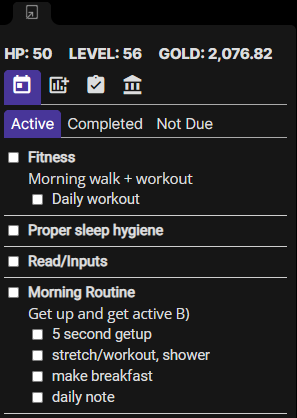
- Dailies
|
|
- Due/Not Due/Completed
|
|
- [](https://gyazo.com/1966b17f954dcffa954922570e860a06)
|
|
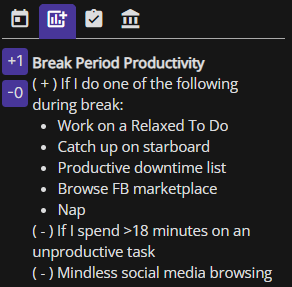
- Habits
|
|
- [](https://gyazo.com/280494e620fc91548838d5b29a62652b)
|
|
- Rewards
|
|
#### Interactivity
|
|
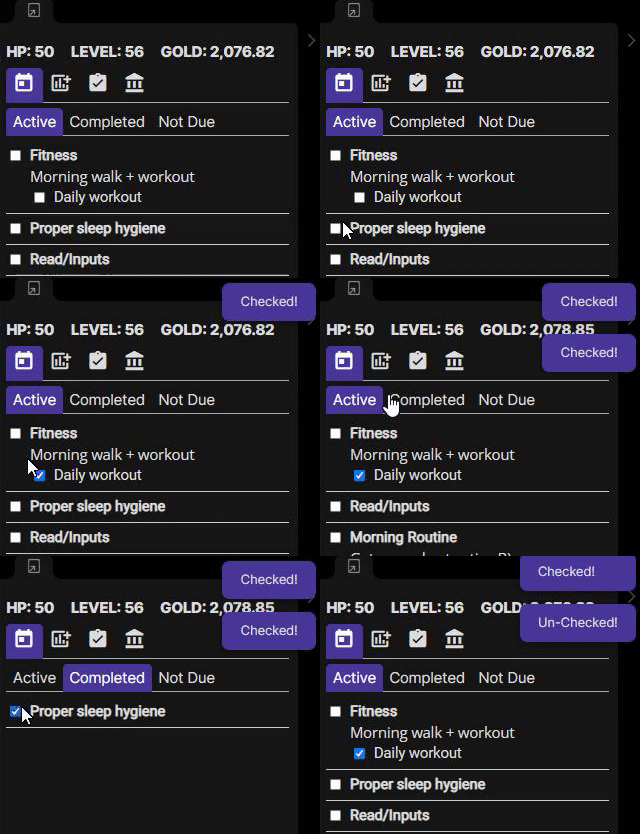
- Check off tasks/dailies in the view
|
|
- Can uncheck completed habits/todos
|
|
- [](https://gyazo.com/efb858cd9d54f9d9df936da1bd5858ed)
|
|
- modify habit counters (+/-)
|
|
|
|
### Settings
|
|
|
|
The following two inputs help fetch your user data to be displayed in the Obsidian view:
|
|
- **Habitica User ID:** You can find this by clicking on the "User" icon in the top right of the Habitica webapp, "Settings", then "API"
|
|
- **Habitica Token API:** You can find this by clicking on the "User" icon in the top right of the Habitica webapp, "Settings", then "API"
|
|
- **Show Task Descriptions:** Toggles whether description/notes for tasks will be shown or not
|
|
- **Show Subtasks:** Toggles whether subtasks for to do's/dailies will be shown or not
|
|
|
|
## Roadmap
|
|
|
|
*Feel free to support us and donate!*
|
|
|
|
<a href='https://ko-fi.com/leonardandran' target='_blank'><img height='35' style='border:0px;height:46px;' src='https://az743702.vo.msecnd.net/cdn/kofi3.png?v=0' border='0' alt='Buy Me a Coffee at ko-fi.com' />
|
|
|